What's new
Every release since this guide was first written, newest first. The live library runs 0.40.0.1.
Cartmark went from its first numbered release to 0.31 in under three weeks, and from 0.31 to 0.39 in the month after. Each release below is a fold: its headline points, and the builds that followed it in one line each. Inside the app, What's new tells the same releases with a More part on every point.
Live 0.40 · a new look for every page, Home with Continue playing, your own colours, Uninstall from the tray, trophies that travel with your saves
- A new look for every page. A dark navy page, slate cards, a purple accent and a plain sans face. The sidebar is short: Library (Home, Games, Platforms, Collections), Manage (Activity, Machines, Needs attention with its count) and Settings at the foot; every other page is a tab over the page it belongs with, and the search box offers the matching pages and settings as you type. Games is a grid of cover cards, 24 to a page, each with its platform, whether you hold it, how many of its files started in a boot test and Play for a game you hold, filtered by platform, verification and, for an administrator, availability; everyone signed in sees the games the library holds. Activity's twelve pages sit in three groups, Overview, Getting games and Downloads. A page that asks you to confirm one task shows one centred card with the question and its press. Lists, detail pages, dashboards and settings follow the same shape: the first view shows what most people come for, the rest sits under tabs that need no script, and a link to any card opens its tab. The sign-in page looks like the rest. Every form, field and address is as it was.
- Home shows how far you are in each game. Your library with Browse all games and a row of counts that each lead to what they count; Recently acquired as three wide cards; Continue playing, the five games you last played with a Play press to each; and on both, your progress in a game's achievements, trophies or gamerscore, drawn in the award's own colour and always said in words too. PlayStation trophies by grade and Xbox gamerscore out of the game's total are read with the title list Cartmark already reads, so nothing extra is asked of either service.
- A game's page wears its own art and puts its sections under tabs. Its first kept fan art, else its first kept screenshot, darkened behind the heading, with nothing loaded from another site; the cover beside the title, its shelves as chips, the store badges, and Overview, Versions & files, Verification, Saves, Achievements and History as tabs. The boot-test card names the machine the game started on. A catalogue entry's page and a collection's page take the same shape.
- Your own colours. Three pickers, accent, background and cards, on My account for yourself, on the household page for its admin, and under Settings › Appearance for the site. Your own set wins over your household's, which wins over the site's, then the built-in purple. Text is never picked: it is worked out as the background's opposite and stepped until it reads at 4.5:1 on both the page and the cards, and a set that cannot be made readable is refused, saying why. Sign-in pages keep the built-in purple.
- Uninstall a game from the tray, or Remove from a PC on its page. The tray asks again, naming the game and the PC, and removes it only once the game is home on the server; where it cannot go yet, the tray says why instead of offering the press. On a game's page an administrator gives the admin password, the PC's owner none, and who asked is recorded. An installed game is let go only once the server holds that very game, a game the library already holds ready to copy stays on the PC, and an install that ended without the game now says so in the tray.
- Monitor a system's list by franchise, series, character, developer or publisher. A system's games list, and its Redump and No-Intro list, narrow by them, a genre and a letter. Monitor these and Unmonitor these act on everything the filter shows, above 1,000 games as one job in the background shown on Status. Unmonitoring keeps skips and never deletes a copy, and a list over 200 games asks for a tick first.
- RPCS3's trophies and user name travel with your saves. Sent and placed with the savedata, never while RPCS3 runs, and kept encrypted on the server, bound to their owner. Two machines' trophies for one game become one set: a trophy is earned where either copy has it, and never taken away by a merge. The games' licence keys never leave a PC. Xbox and Xbox 360 games on the Batocera box start at once with save sync on; a PS3 game there still waits, and the TV says why. A PS3 game kept as a folder whose scan could read only part of it can be sent to a PC with the accept-it-unscanned tick.
Builds 0.40.0.1: a Windows PC whose clock is set back keeps checking in, reading saves and answering the tray.
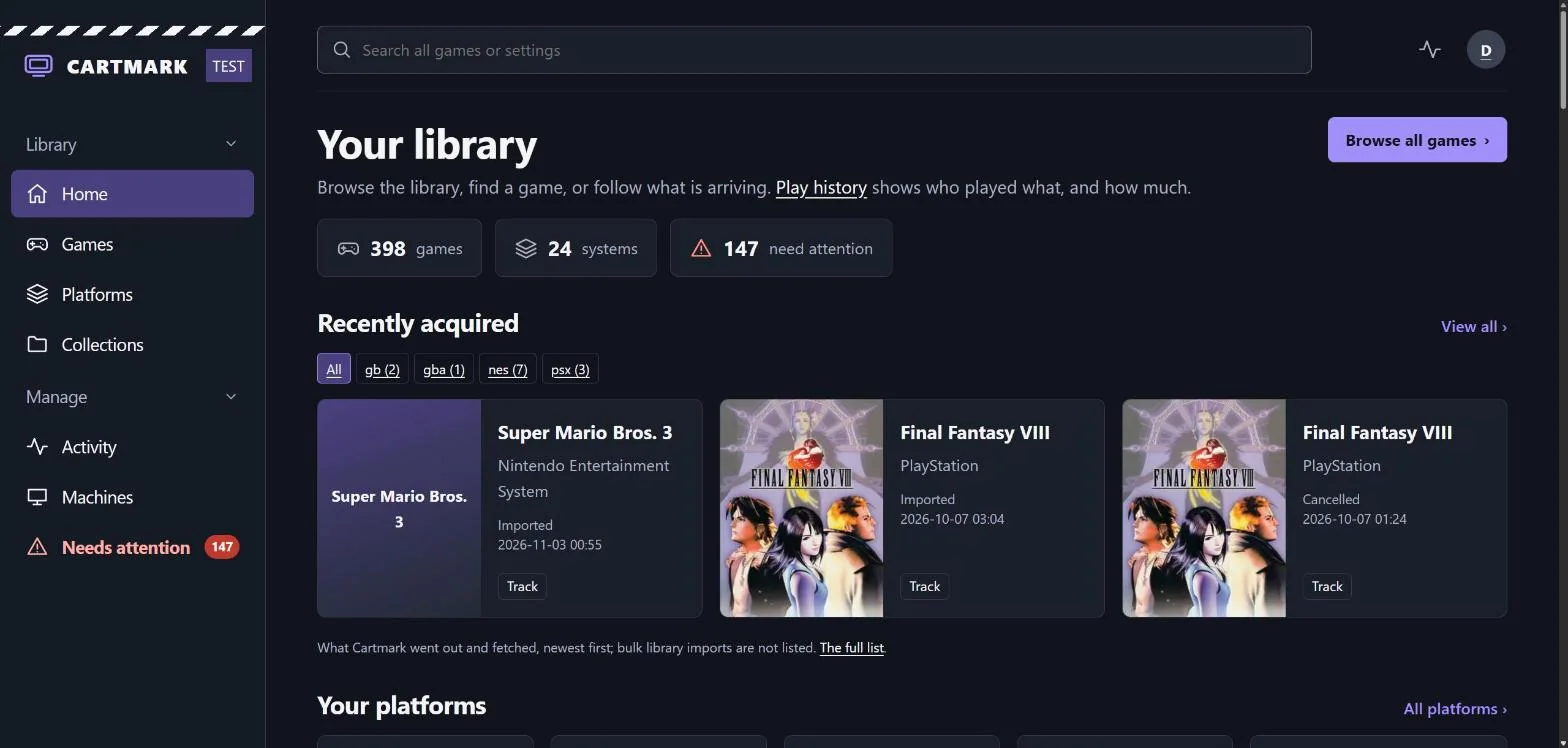
Home: the short sidebar, Your library and its counts, Recently acquired as wide cards. On a test install, as a household admin named Demo sees it. 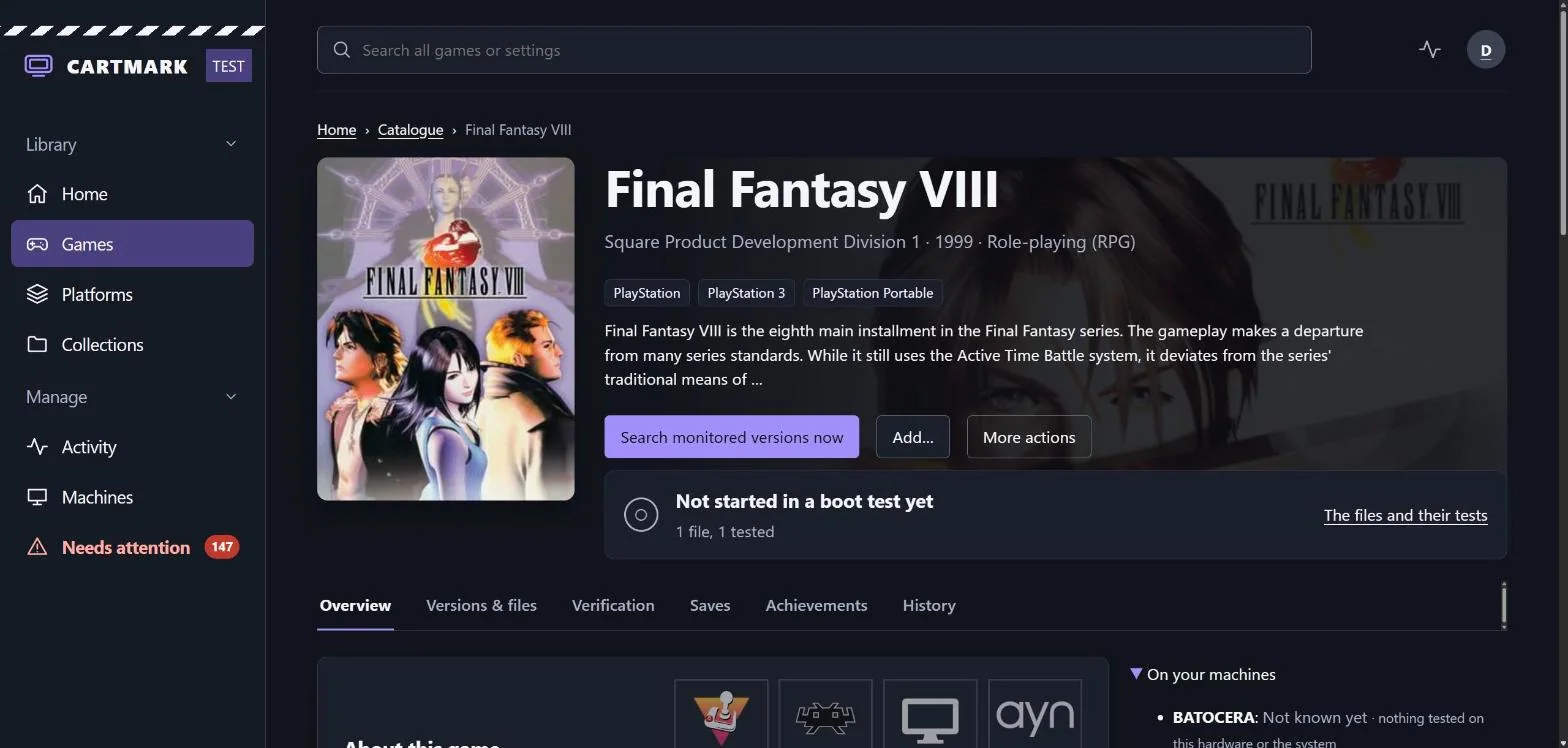
A game's page: its art behind the heading, the cover beside the title, and its sections as tabs. On a test install, as a household admin named Demo sees it. 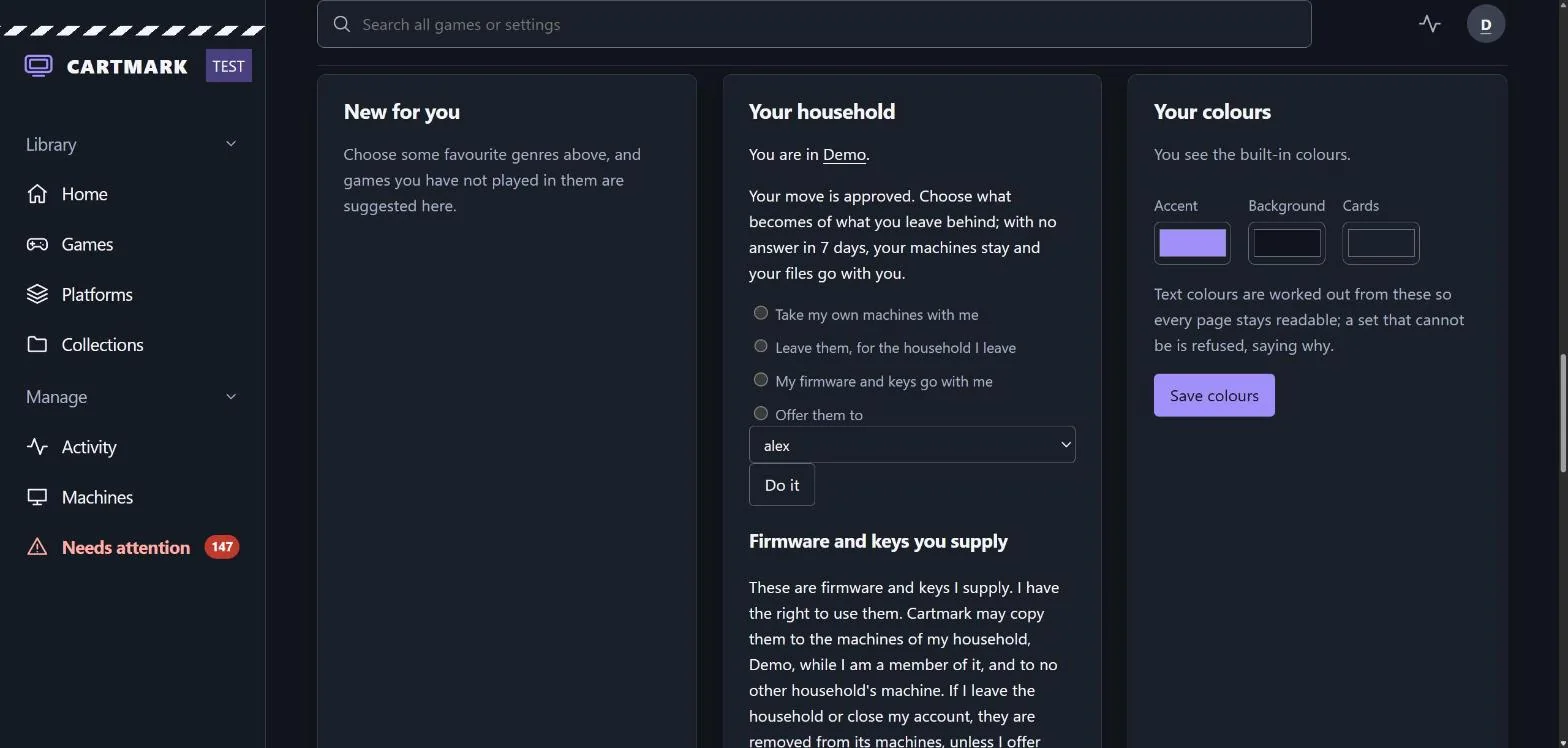
Your colours on My account: three pickers, and the text colour worked out for you. On a test install, as a household admin named Demo sees it. 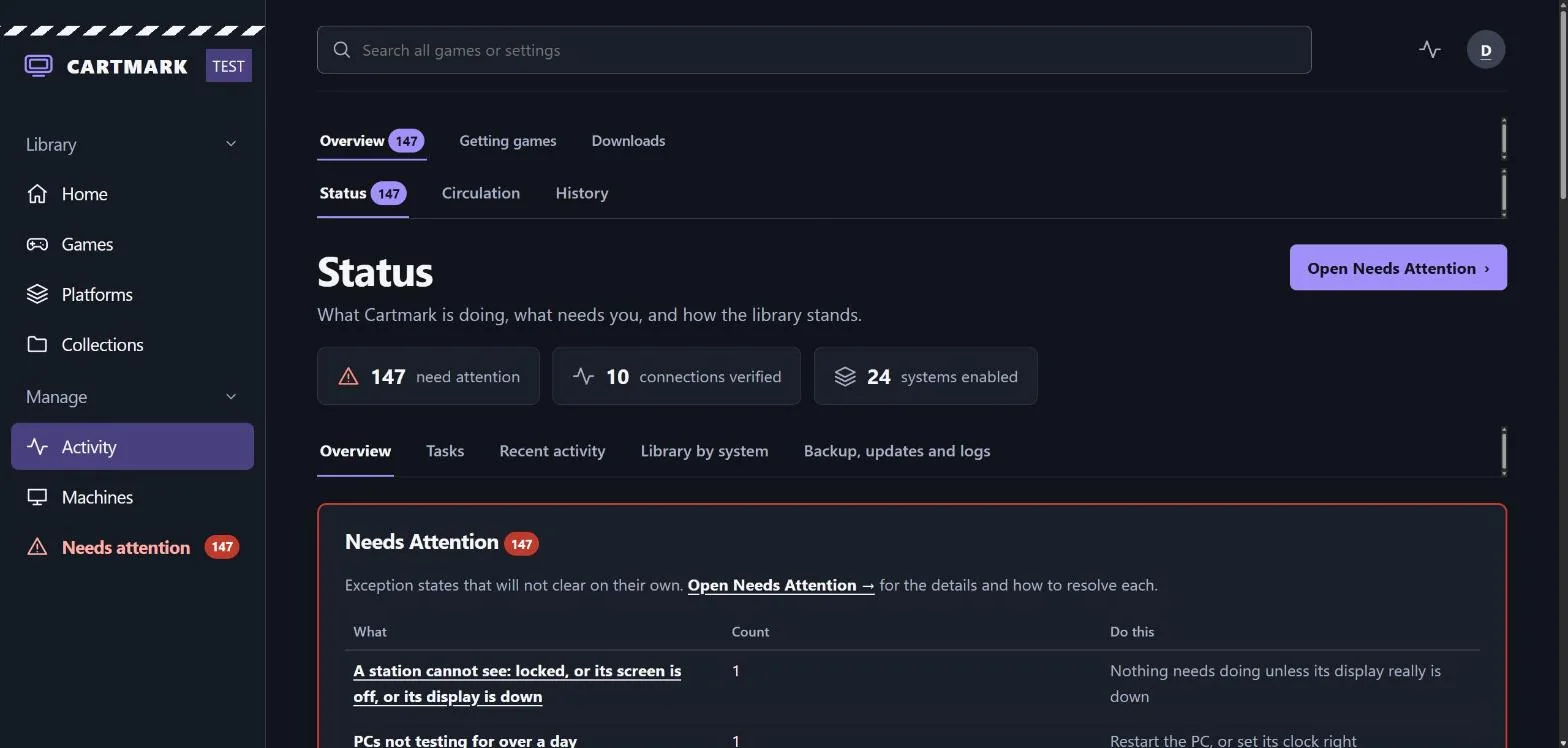
Activity: three groups, the pages of the one you are in, then the page. On a test install, as a household admin named Demo sees it. Live 0.39 · imports that settle themselves, the arcade shelf, the tray's Emulators menu, loans with a length and a limit
- Blocked imports mostly settle themselves now, a Re-check button checks them again, and the few that need you have one button that settles each. Needs attention has Re-check these, for the whole list, one system or one cause, and a download's own page has Re-check now. Detection learned a good deal: PC Engine CD, PC-FX, 3DO, CD-i and Amiga CD32 discs are known by their label, a ROM with no header is settled by its checksum, a game zipped inside its download is opened one level more. What only you can decide carries one button: Not this: search again, and Put it on the Windows shelf.
- An arcade shelf: arcade sets are proven file by file against MAME's own list and go on the mame shelf under the name MAME finds them by. A set from another MAME version, one split from its parent, several merged into one zip, or one that also needs a disk image is held and says which. A set already on the shelf is never replaced.
- Starting an emulator from the tray waits for your saves first, saves made outside Cartmark are kept safely, and you can take over a shared machine from the home page. The tray's Emulators menu brings in your saves for that emulator or core first, with Cancel, and starts nothing until they are all there. A game started from an emulator's own shortcut is seen too; its save becomes your newest only where the play began on your newest save.
- Loans have a length and a limit, Wii and Wii U games play on a normal pad, and members confirm with their own sign-in password. Every game lent, copied or installed to a machine runs 14 days by default, is warned of two days before, and goes back by itself with its saves kept; three loans a person unless an admin sets another number. Only admins keep a separate admin password.
Builds 0.39.0.1 to 0.39.0.19: a handheld's saves where RetroArch keeps them; a full admin confirms with their sign-in password; a Cartmark password confirms an act however you signed in; a household's last admin names who takes over; a Show/Hide button beside every password field; an unlock lifts its address blocks; confirming by signing in at your provider again; console games lent to a Windows PC and Manual import; Needs attention leaves what settles itself; a console disc the scan could not read whole cleared by its Redump or No-Intro entry, and each system's own list; a system's missing games monitored from its list, and a sleeping PC woken for its work; a PC game's files checked against GOG's own builds; each system's RetroAchievements upgrades; one system's settings copied to the others; the lists filtered by region; each Windows shelf's GOG upgrades; a set fetch's running count; the lists reaching the games a catalogue link misses.
Live 0.38 · the Windows tray, Steam-style notifications, who's playing, player PINs, guests, achievements; every save version kept
- Cartmark in the Windows taskbar. A Cartmark icon by the clock shows whether the PC is healthy, who is playing here and across the house, what is lent and copying, and your recent games, with buttons to pause testing, sync saves, return a game or report a problem. The tray is a signed script the worker checks as it checks its own updates, and it never holds the PC's key.
- Notifications like Steam's. Dark cards with the Cartmark logo pop up for saves kept on the server, games arriving, tests finished, players switched and more. Up to three at once, a click opens its page, and each kind can be switched off; during quiet hours they make no sound.
- Who's playing. Each machine has a player who gets its saves and play time. Signing in to Windows makes you the player; switching to someone else needs their player PIN; guests from other households scan the code on the screen to play as themselves.
- Achievements. My achievements gathers your RetroAchievements and Steam achievements: playing now, recently unlocked, in progress and finished. Compare with everyone on the server, game by game, and take part in competitions. You choose who sees yours.
- Every version of every save is kept for good (0.38.3), and My saves lets you see each one and bring any of them back, with the current one beside it. On the Batocera box, each player keeps their own PS2 memory card, game night never waits for the server, and handhelds update themselves. BIOS, firmware and keys stay within the household they came from. Nothing sent to a PC is left stuck, installs ask a fair amount of room, and games you play get their boot test first.
Builds 0.38.1.0 to 0.38.3.1: achievements as a link on every game and a card on each game's page; an install stopped for administrator rights can be finished, removed or left; the Unpacking page; recently played games from eight emulators launch from the tray; native save adapters and RA save trials; saves scoped before paging and native memory cards at 64 MiB; one tray submenu for RA copy decisions; a handheld's first loan of a system, its folders made up front.
Live 0.37 · Cartmark's own ntfy server, Add… on a game's page, what each virus scan is scanning; Android handhelds
- Cartmark can run its own ntfy server, so codes reach each person's phone with nothing set up by hand. It is off unless you ask for it, set up and checked by Cartmark itself, reached over your tailnet and never opened to the internet. Each person opens My account › Get codes on your phone and follows five steps; their codes come there from then on.
- An admin can add a game to the systems they want, from the game's page. Add… lists every system the catalogue has that game on; each ticked row is monitored or not monitored, and nothing is added or fetched until you press Add.
- The Tasks list says what each virus scan is scanning, how big it is, why it is waiting and about how long it may take. Worked out from how fast this server has scanned its last ten finished downloads; where there is no history yet, it says nothing rather than guess.
- Android handhelds borrow games over Tailscale (0.37.1) and check in only when they are on. Machine types, handheld sync rules and save-game sync; a PC is Shares only or a Full station, switched from its page; the device key sealed and tokens renewed; a station starts only the worker the server signed, and tests reach nothing on the internet; Add a device, with a person's own PC code in the line.
Builds 0.37.0.1 to 0.37.1.20: Windows games in one archive unpacked on the shelf; the library share account for every PC on the house network or Tailscale; a game's screenshots and fan art on its page; Steam achievements and Early Access metadata; partly scanned games wait to be validated and real threats go within two hours; the antivirus scan's own scratch space; validators that prove a copy read in part another way; worker 167's rollback, holds, throttling, Run diagnostics and Wake on LAN; "On your machines" on game pages; the search box finds places in Cartmark.
Live 0.36 · codes to a channel that is yours, sign-ins from unusual places held, a partly scanned game held, a game installed on a PC comes home
- Codes go only to a channel that is yours, and a locked person can unlock themselves. Each person may make a security topic on ntfy, proved theirs by typing back one code. Locked out by wrong passwords? The sign-in page's "Locked out?" link sends up to three unlock codes to your proved channel.
- A sign-in from somewhere unusual waits for a code, and every sign-in is listed. Outside a person's home countries, or from a place nobody could have reached since their last one; the house's network and the tailnet are never held. My account › Signed-in devices lists each sign-in by browser, place and time.
- Admins can lock a person by hand and sign them out everywhere; the super admin sees sign-in attempts by address. Settings › Sign-in attempts shows each address wrong passwords came from, with a rough place and its network, and an address or a narrow range may be blocked for good.
- A Windows game the virus scan could not read whole is held (0.36.3), and you can accept it for one install. The acceptance covers that one install, on that one PC, of exactly those files; a real finding stays held whatever is ticked. A file swapped for another of the same size with its old date copied over is now noticed.
- A game installed on a PC comes home right away, gently, and pauses when it should. At up to 2 MiB a second while the PC is in use and with no limit in its quiet hours; paused while the game runs or the PC is busy online. Imports say what they are doing, never sit stuck, and a Windows game in one archive is unpacked.
Builds 0.36.0.1 to 0.36.2.3: a small archive that would unpack past its console's size refused before anything is written; a threat's original download removed from the download client; members can use their own security settings; big archives import within the memory ceiling; one virus scan at a time.
Live 0.35 · Windows games install on a PC from their installer; wrong passwords recorded and too many lock an account
- Windows games install on a PC from their installer, with a person at the PC saying Yes to Windows' prompt. Copy and install copies the installer to the PC, checks it, and runs its setup there; the page shows each stage. Removing a game leaves no folder behind: saved games move to Cartmark Saves, other files to Kept.
- Wrong passwords are recorded and too many lock an account; installing or copying a game asks your password once for 15 minutes. Ten wrong passwords in 15 minutes lock that person, and the addresses the tries came from are refused for 24 hours, never the house's own network. The super admin is locked only from outside.
- Each game on a machine has a fold of its own, and finished transfers are listed. A machine's page lists each installed game with its size, when and by whom it was installed, its loan and its last attempts with their reasons.
- Names fit every disk, and the library sorts itself out more. Names with symbols are renamed on disk at an admin's press, saves and all, and every name Cartmark writes fits within 150 bytes and Windows' path limit.
Live 0.34 · every Windows download virus-scanned; downloads held to their console and a sensible size
- Windows downloads are virus-scanned before anything can run them, and a copy found to hold a threat is set aside out of reach. Every Windows game and installer that arrives is scanned by ClamAV before it is listed for a box, installed on a PC, copied to one or downloaded. A copy judged a threat is quarantined under a random name, never run and never downloadable, and deleted for good after 7 days. Scanning is on from the start; only the super admin can switch it off, with a recorded acknowledgment that is never removed.
- Downloads are held to their console and to a sensible size before anything is fetched. Every system has a download size ceiling; an archive.org item's files are read before it is fetched, so a console's search no longer brings home a computer's download.
- File names carry no symbols, and the shelves look after themselves. Collections refresh by themselves in the quiet hours, a reshelve never gives two files the same name, and a game's page says which folder its files are in.
- Windows PCs keep a Cartmark folder of shortcuts, names with accents arrive whole, and security improvements. An archive is looked inside one way, which refuses one whose listing cannot be read, that names a file outside its folder, or that writes through a link of its own. An Android app inside a console's download counts as a program.
Live 0.32 and 0.33 · the jobs explained, franchises brought in, who played, upkeep on its own
- Every background job explained, for everybody signed in, and a first-run guide in the right order.
- A franchise with nothing in the library brought in with one press, and developers and publishers monitored whole after a confirm that says what it will do.
- Who played. Each game on a shared machine credited to the member who played it, and everybody's own play and favourite genres.
- Upkeep on its own, in quiet hours the owner sets, and a queue that looks after itself.
- Machines hardened by default, unless their owner keeps their own setting.
- A search you can watch, and a computer game placed whole.
Live 0.31 and before · what the first three weeks brought, up to 0.31.1.33
- Boot tests are filmed and read by the server as they run, so a crashed game is stopped in seconds and a game that is installing gets more time.
- Twitch Drops, with a watcher, a plan, a gallery of every reward, channel points and a calendar feed, then deadlines and a speed limit.
- Game Pass and PlayStation Plus counted as games you can play, with a notice before one leaves and a reminder before you are charged.
- Alerts and dashboards: ntfy, Discord, and a bundled Grafana dashboard with alert rules. Play tracking on every machine.
- Machines at another house, over a private Tailscale link, with an encrypted, key-checked connection for every machine.
- A proven backup before every upgrade, and keys and passwords kept out of the database.
- Every import is checked in eight steps before it reaches a shelf. A machine's word needs a picture.
- A game left running is noticed, and what you are playing is yours alone.
- Needs attention that fixes itself first, one queue with one door, and about fifty security fixes across the whole program.
- The whole library, tested again from nothing: 21,043 tests of 20,851 files in under a day, 19,098 of them started.
- An app on your phone, Final Fantasy 7 finds Final Fantasy VII, a serial audit, and history you can read on a phone.
- Households, firmware and keys by household, a BIOS admitted by its checksum, machines that say what they hold, a super admin, BIOS Approved said in full, machines assigned to people and knowing what they are made of, a Connection card on every machine, the emulator's own words, games suggested as you type, What's new in plain words, and Windows games on the box with their installers on Batocera's own shelf.
Showing 8 of 8 releases