Stop leaving streams running overnight
Twitch Drops are free in-game rewards for watching a stream for an hour or four. Earning them means leaving a tab open and hoping. Cartmark does the watching on the server, works out which rewards can still be finished before their deadline, and tells you the moment one is ready.
What it does for you
- Watches for you. A boxed-in browser on the server plays the stream. Your PC can be off.
- Plans the clock. It aims at the rewards that can still be finished in time, and gives up on the ones that can't, so no hour is wasted.
- Picks good streams. Your favourite channels first, then ones you follow, then ones that earned before. If a stream stops earning, it moves on.
- Tells you when it's ready. An alert on your phone or Discord when a reward is earned, a game account needs linking, or a campaign is about to end.
Every reward, under its game
Ready to claim, still being earned and already claimed, grouped by game with cover art and a link straight to the claim button. Twitch's own record of a claim names no game; Cartmark works it out and files it for you.

Channel points, a calendar and the figures
- Channel points: each channel's balance and what every session gained, with the bonus chest pressed for you if you tick it.
- A private calendar feed of your Drops deadlines for your phone's calendar, with a last-chance entry before each one ends.
- Figures: watch time and rewards by week, game and channel.
- Quiet hours, so your phone is left alone at night.
- Game connections read from Twitch once a day, so you see at a glance which game accounts are linked.
The plan, shown to the minute
For every person, the page shows what is being watched now, how far along each reward is, how many minutes are left, when it is expected to finish and when the campaign ends. Up to five games of your choice are always watched first. A game you already own on a connected store is marked as yours.
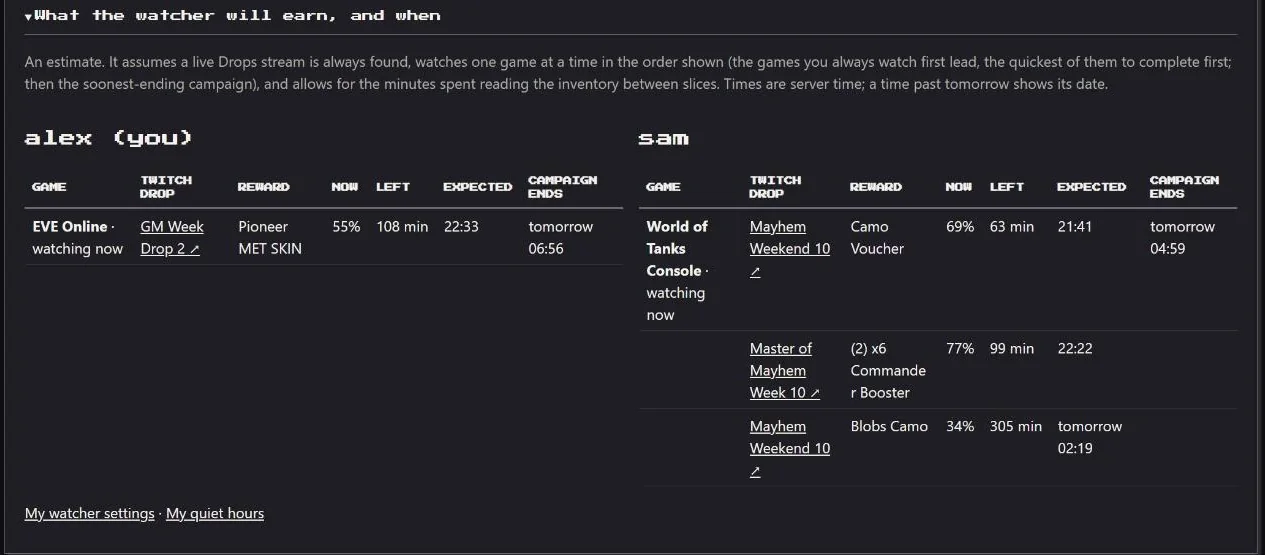
With more people than streams, the account with the least room before a deadline goes first. A campaign listed as "thirty minutes to four hours" is planned by its shortest reward as well as its longest, so nothing winnable is abandoned.
Planned: the rewards of a campaign not yet started will be learned before its turn, so the schedule plans by each reward and not by the campaign's total.
Claiming
Ready rewards appear at the top of the home page with one link that opens Twitch's Claim buttons, and an alert goes to your phone or Discord the moment one is ready. You press Claim yourself; from a phone it takes a few seconds.
- Every ready reward shows its last day. Twitch lets a reward be claimed until 24 hours after its campaign ends, and Cartmark counts down to that.
- An urgent reminder six hours before it is lost, sent again through every alert route you have set up.
- Watching keeps to an hourly limit and stops by itself if Twitch objects, so the house's connection is not taken for a robot.
- A reward whose game account isn't linked yet is named, with which account to link.
Why nothing is pressed for you. Cartmark used to offer to press Claim. Twitch now refuses every claim made from a server's browser, whatever address it comes from, so automatic claiming is switched off and nothing is pressed on your behalf. Watching and earning carry on.
Straight about it: Twitch decides whether it accepts a claim from a server's browser, and sometimes it doesn't. When that happens Cartmark says so plainly and leaves the one click to you. Watching and earning carry on regardless.
How the sign-in is handled
What it does
- You sign in on your own PC. One command hands the session over; Cartmark never sees your Twitch password.
- The browser is boxed in. It sees its one profile and none of the server's files or settings.
- It warns you early. A week and a day before the sign-in runs out.
What it never does
- Mix people up. Each person's session, rewards and alerts are their own.
- Keep anything after you leave. Closing an account removes every Twitch and alert row of yours.