Cartmark · self-hosted · free software
You own thousands of games. How many of them actually work?
Cartmark is the library manager that stops taking your collection's word for it. It knows every game you hold, on a disk or on a store account. It knows where each one came from. And it switches every one of them on, on the machines you really play on, and keeps the picture to prove it.
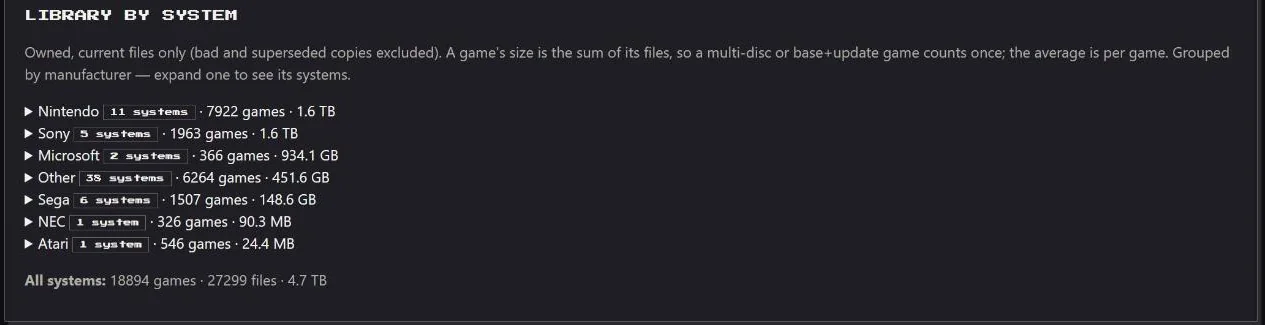
Not a demo: these are the figures from one real library, read from its own Status, Shelves and Results pages, Atari 2600 to PlayStation 3. The boot results count from the day the whole library was last tested again from nothing. Every figure on this site is read from a page like that, not estimated, and nothing happens off the record.
Three questions, answered for every game you have
"I own this game" and "this game works" are two different claims. Cartmark is built on never confusing the two.
Real boot tests, recorded by the machines themselves
More recordingsNobody pressed a button for these. A machine picked the game up from the queue, launched it, pressed Start when the game asked, and sent back what it saw. The recording stays on the game's page for good. Every game pictured on this site is homebrew, made by independent developers for old hardware.
What you get on day one
The full tour- A library you can trustBad rips, half-copied discs and files on the wrong shelf are found for you, before game night finds them.
- Never overpay againEvery store's price side by side, five years of history, and a plain verdict from +++ to −−− on whether today's sale is really a good one.
- Every free game, claimedEpic, Steam, GOG, Prime Gaming and thirty more stores watched daily. Steam's can claim themselves.
- Twitch Drops on autopilotThe server watches the streams so you don't have to, plans what can still be earned, and tells you the moment a reward is ready.
- Games you keepYour GOG and Steam libraries downloaded, checked against the store's own checksums, scanned for threats, and made to run on the TV or installed on a PC.
- It tells you, you don't askPhone alerts, Steam-style cards on the PC, a Needs attention list that says what to do, and a ready-made Grafana dashboard.
- Careful by designNothing deleted, every change planned first, a proven backup before every upgrade, every Windows download virus-scanned, and no telemetry at all.
- Every machine in the houseThe TV box, the gaming PCs and the handhelds each join with one code, report for themselves, and know who is playing.
- Room for more than one homeEvery person and machine in a household, each run by its own household admin, with firmware, keys, saves and loans kept to the household they belong to.
- A small icon that does a lotBy the clock on every Windows PC: who is playing, your recent games started with the right saves, lent games, testing paused while you play, and cards like Steam's.
- Reach it from anywhere, open it to nobodyA PC at another house, a handheld on the road or a phone away from home joins over a private Tailscale link; nothing is ever put on the internet.
- Machines that say what is wrongEach machine reports its hardware and its connection, with plain hints on what would make it faster.
One page per game, and it knows everything
Cover art, description, genre and series from the catalogue. Which of your machines it starts on. Which copies you hold and which is the best one. Whether its achievements will work, and how far you have got. What it costs today on every store, and whether you already own it somewhere.
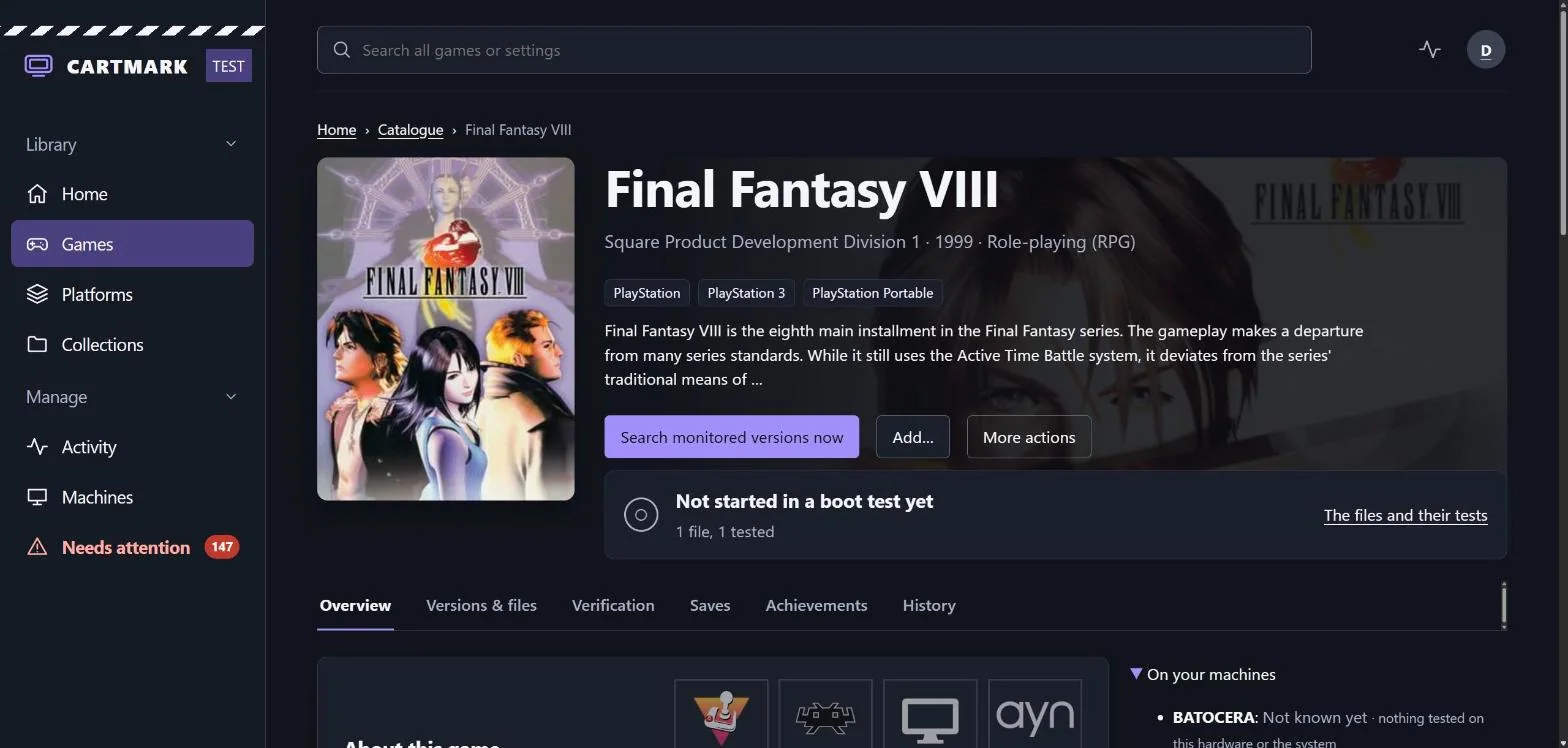
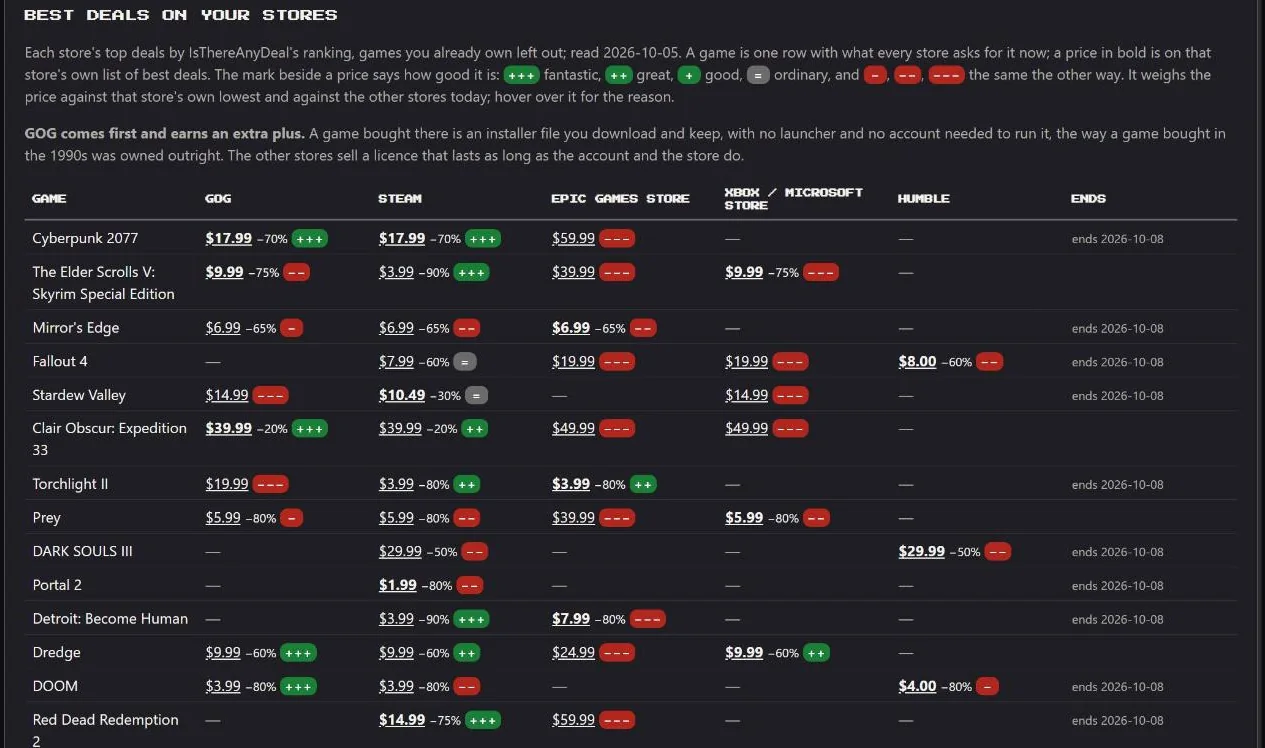
Newest release: 0.40
The live library runs 0.40.0.1.
- A new look for every page: a dark navy page, slate cards, a purple accent, a short sidebar, and the rest of each page under tabs.
- Home shows how far you are in each game: Continue playing, with your achievements, trophies or gamerscore in the award's own colour.
- Your own colours, for yourself, your household or the site, with the text worked out so it always reads.
- Uninstall a game from the tray, or Remove from a PC on its page, only once the game is home on the server.
- Monitor a system's list by franchise, series or character, in one press, with nothing deleted on the way back.
The figures come from the Status page
What Cartmark is not
Cartmark is a manager, not a source. It does not host, distribute or supply game files, and it ships no list of where to find any.
- It manages files you already have. What you point it at, and whether you are entitled to those files, is your responsibility.
- It searches only sources you set up yourself. Nothing is configured out of the box.
- Store games are downloaded with your own account and your own licence, from the store that sold them to you.
- It never stores a store password, never spends money, and never claims anything that is not free at that exact moment.
It is free software under the AGPL-3.0 licence: use it, study it, change it and share it. Every service it talks to is on a list you can read.