Households
One server can look after more than one home. Every person and every machine belongs to one household, each household has someone to run it day to day, and the firmware and keys people supply stay with the household they were meant for.
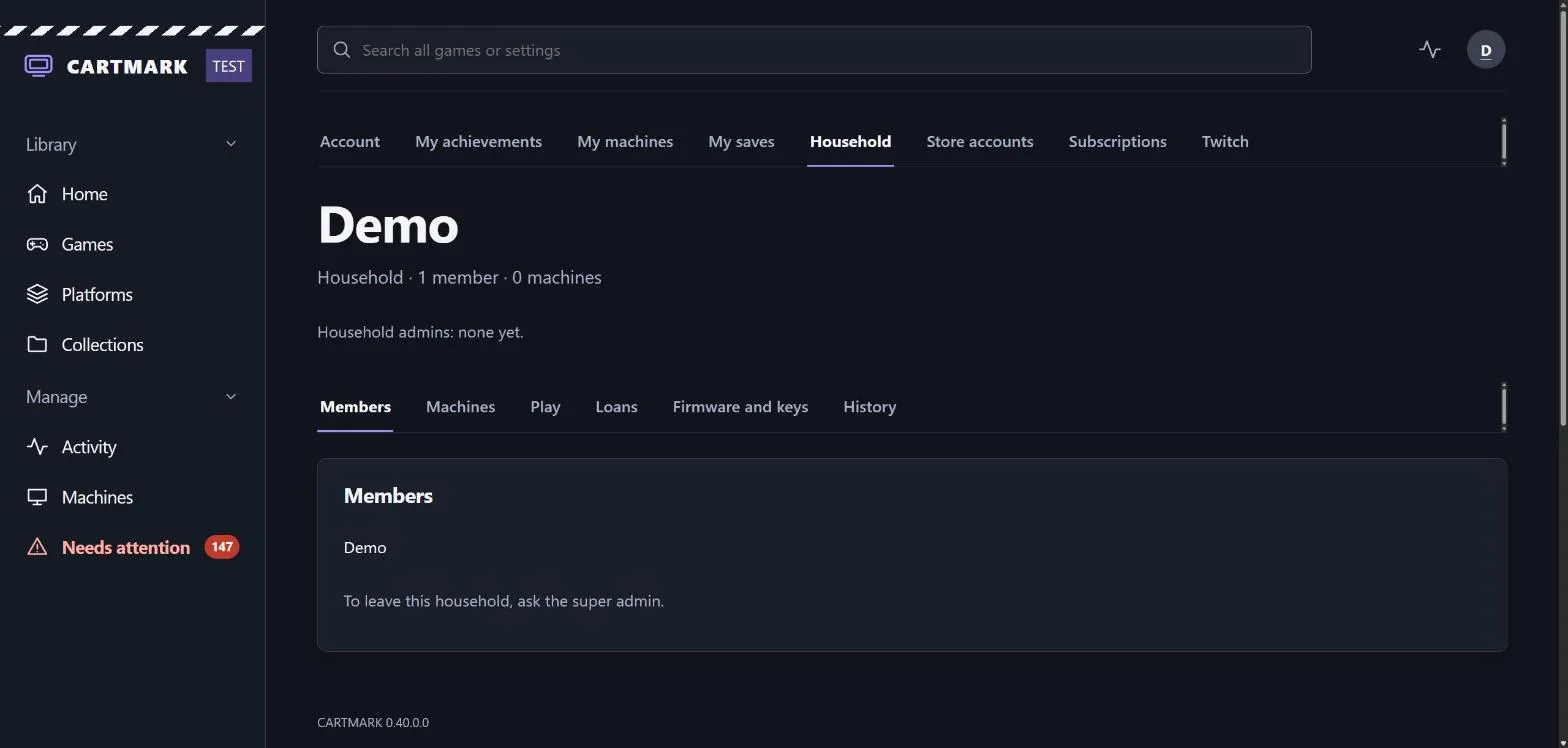
Every person and every machine has a household
- Every account is in exactly one household, and so is every machine. The server owner's household is called the house.
- Nothing changes on upgrade. Everyone and everything already on the server joins the house, and the super admin becomes its household admin. A second household exists only once the owner makes one.
- A machine joins a household when it enrols. A code made on the Machines page enrols into the house; the super admin can make one for another household instead.
- Members see their own household. Every machine of it, with its statistics, its tests and its connection hints, at My machines and on the household page. Another household's people and machines are not shown to them at all.
Three levels of admin
| Level | What it is for |
|---|---|
| Household admin | Runs one household day to day: unlocks a member who is locked out, resets a member's password, invites people, confirms a machine's hardware change, corrects who a game on the household's machines is credited to, restores a member's save, sets the length and number of loans, and names a new owner for a machine a member left behind. |
| Admin | Runs the server: the library, the machines, the settings. Sees every household and its members, and changes none of them. |
| Super admin | One account, the server owner's. Makes, renames and closes households, appoints household admins, moves people and machines between households, and alone BIOS Approves a machine. |
- A household admin acts only on the ordinary members of their own household: never on an admin, never on another household admin, never on anyone in another household.
- Every household admin act asks for their admin password, and is written into the household's History, which every member can read. Members confirm their own acts with the password they sign in with.
- A password reset never hands over an account. A member who gets phone alerts is sent a link to choose a new password themselves, and the household admin never sees it. A member without alerts gets a one-time password that must be changed before anything else can be done, and is told on their next visit.
- A household always has a household admin. The last one names who takes over before they can leave, close their account or be removed.
Nobody is added without saying yes
- An invite waits for its answer. A household admin invites an existing account, which sees Accept and Decline on My account, or a new person, who is given a link to make their own account. An unanswered invite lapses after seven days, and the inviter can see where each one stands.
- An invite makes an ordinary member, never an admin.
- Moving to another household takes two yeses: the super admin's, or a household admin's from each of the two households. Nobody approves their own move, and someone who wants to leave asks the super admin. A waiting move finishes by itself once both have said yes.
- The person who moves decides what comes with them. On My account they choose whether their own machines go too or stay behind, and whether the firmware and keys they supplied follow them or are offered to someone who stays. With no answer in seven days, the machines stay and the files follow.
- Every step is on the record, in the History of both households.
- A household with nobody left in it is closed, not erased. Its records are kept, and the super admin can open it again by adding a person. One that never held anything can be deleted.
- Closing an account leaves its machines with the household, without an owner, and removes the firmware and keys it supplied, unless they are offered to a member who accepts them.
Who played
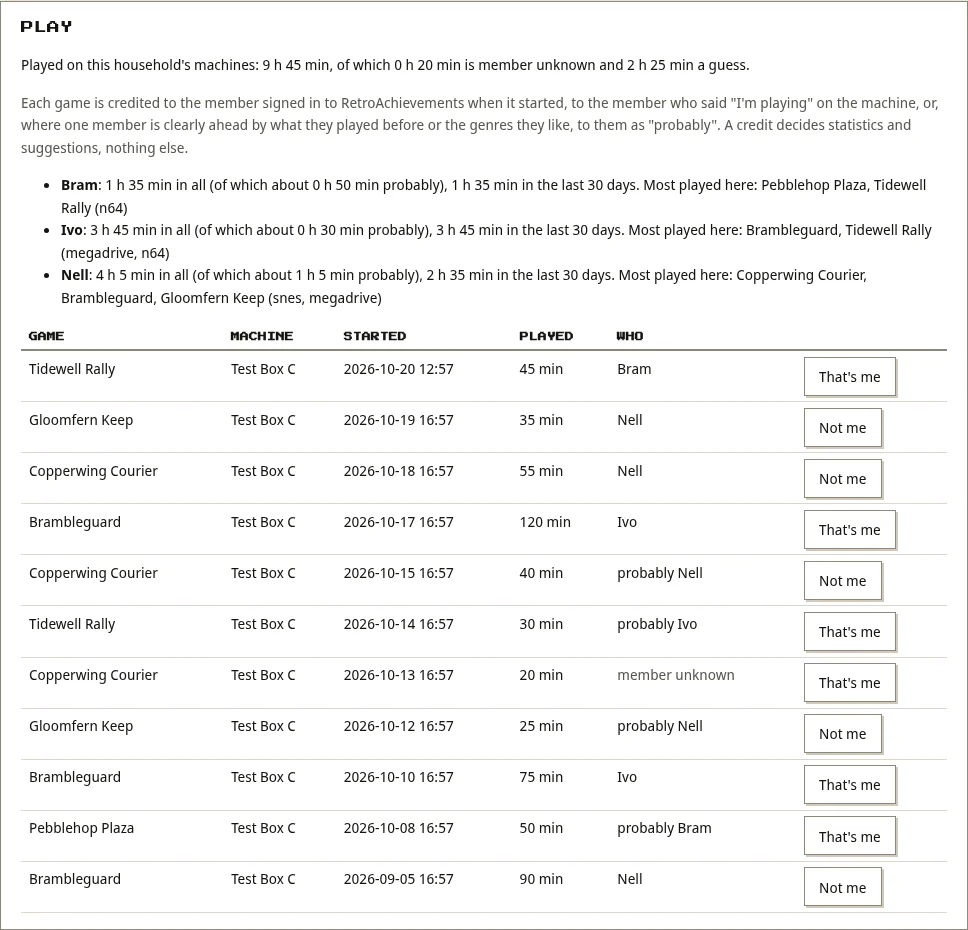
Each game played on a shared machine is credited to the member of its household who played it, as it arrives. First the machine's player, where the machine knows one; then the member signed in to RetroAchievements when it started, where they have connected that account; then a member who said "I'm playing" on the machine's page or with its printed QR code; then, where one member is clearly ahead by what they played before or the genres they like, that member, marked probably. Otherwise it stays member unknown. A credit decides statistics and suggestions, nothing else: no firmware, no keys, no approval.
- The household page shows the household's play together and each member's, over all time and the last 30 days, with how much of it is a guess, their most played games there, and the latest sessions.
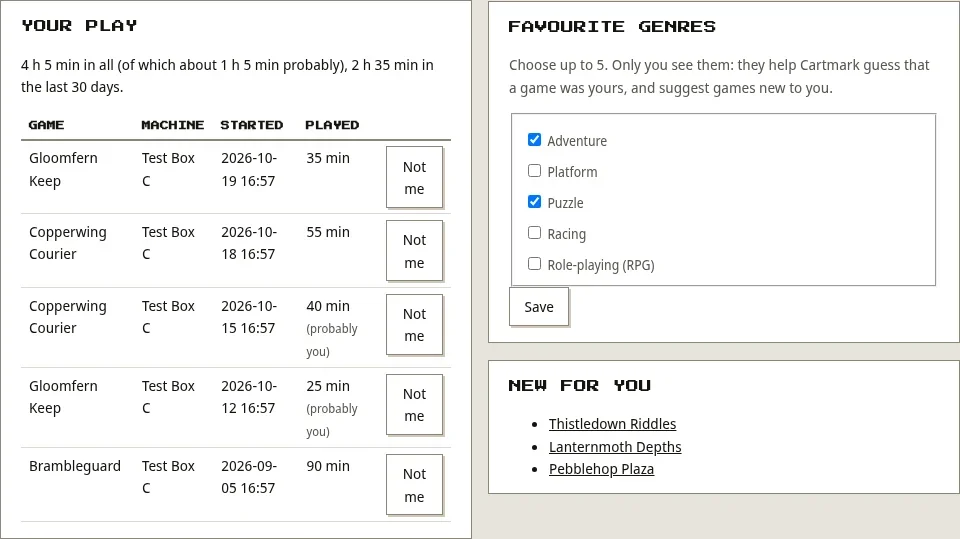
- Anyone can put a credit right: "That's me" on a session that was yours, "Not me" on one that wasn't. A household admin can give a session to any member.
- My account shows a person's own play, up to five favourite genres they choose from the catalogue (only they see them), and a few games new to them in those genres.
Who's playing, on the machine
Each machine has a player who gets its saves and play time. Signing in to Windows makes you the player; switching to someone else needs their player PIN, set on My account; and guests from other households scan the six-character code on the screen to play and save as themselves, with the household's admins and the PC's owner told. How the player, PINs and guests work.
Achievements. My achievements gathers each person's RetroAchievements and Steam achievements: playing now, recently unlocked, in progress and finished. Compare ranks everyone on the server by points, unlocks, hardcore unlocks or games mastered, or sets you against one person for the games you both have, and admins start competitions over set dates. Who sees yours is your choice: everyone on the server, your household, or only you.
What people supply stays with their household
Cartmark ships no firmware and no keys. They come from the people who own them, and none of it is used until the super admin switches its use on, under a plain statement. Since 0.38.3, BIOS, firmware and keys stay within the household they came from; games and media are shared as before.
- Each household supplies its own, from hardware it owns. A household's supply that matches the house's own copy waits until its household admin confirms it was dumped from their own hardware. Household admins get a "Get your household's firmware working" checklist on the household page.
- The house's own firmware and keys reach the house's own machines with no approval needed, once the super admin has turned on their use. A PC you own takes your own firmware always, and the rest of your household's where an admin made you a member; otherwise it waits for approval.
- Another household's machines get none of the house's unless the super admin BIOS Approves that machine, under a statement that names its household. The house's firmware copied onto another household's machine is taken back once, only where it is still exactly as it was placed. A machine that moves to another household loses its approval.
- A member can supply their own: firmware, PlayStation 3 disc keys, Nintendo 3DS console keys and SBI files, on My account, after agreeing that they have the right to use them. Those files go to every machine of their household, and to no other household's. A BIOS is admitted by its checksum alone, never by its name.
- When a member leaves, or closes their account, their files come off the household's machines, unless they offer them to a member who stays and that member accepts them as their own. An offer nobody takes up is removed after seven days, and the super admin can clear files stranded by earlier closes or moves from the household's page.
- Paused, not lost. A disabled account's files go nowhere while it is disabled, and a machine held for a hardware change receives none until a person confirms the change.
A BIOS by its checksum, never by its name
A filename is not evidence. A BIOS file a member supplies is taken only when its checksum matches a trusted reference: the published firmware lists, and the house's own reference, which Cartmark rebuilds from its firmware folder at every start and which the super admin widens by adding a No-Intro or Redump list on Settings. Nothing anybody uploads ever adds to that reference.
- Checked on your own device first. The browser reads the file and works out its checksum before anything is sent.
- Already here? Nothing is uploaded. Where the server holds those bytes, the browser proves it has the whole file by a one-time challenge, and the household is granted the existing copy.
- Unknown? Refused, and not uploaded. The page says the file is not in the trusted reference and to ask the super admin to validate it.
- Kept once. Identical content is stored once, with a separate grant for each household that supplied it, so removing one household's grant takes nothing from another.
- Listed for everybody. About shows each system's accepted BIOS filenames and checksums, marks a name with no trusted checksum as not yet accepted, and gives the built-in Windows, Linux and macOS commands that read a file's checksum without running or uploading it.
Placed with care, and kept in place
Each machine puts a member's files in place itself, and is careful about it:
- Where its own emulators look, under a name it already knows, and only after checking that the file arrived whole and is the file it should be.
- Never over a file it did not put there, and never into the house's shared library or onto a network drive. If a machine's firmware folder is the shared one, the file waits, and the machine's page says why and what to do about it.
- Checked every hour. A file that has gone missing is put back. A folder that was away, such as a disk that was unplugged, is put right when it returns. If an emulator now looks in a different folder, the file is placed there and the old copy cleared once its folder is back.
- It removes only what it placed, and says what it removed.
- It says what it holds. Each machine reports the firmware and keys Cartmark placed on it, by name and checksum, only when that set changes. No folder is listed and no game or save is named, and a disk that is unplugged is reported as asleep, not lost. The machine's page lists what it has lost and what brings each file back.
- A machine that stops being the house's has the firmware the house had copied to it taken off again.
Anything a machine could not place is listed on its page, each with a plain reason.
What households make possible
Households were the first of five goals to be met before Cartmark 1.0, built in order. Four are live: households, who played, who's playing on the machine's screen (the player, PINs and the guest code), and saves that follow a person across their household's machines, with every version kept. Still to come:
- A household save for a game the whole household shares a save in, per player for now.
- The box's own on-screen code for guests, which a PC already shows.
- Player machines at other houses, playing from your library with small games streamed and big ones loaned; Android handhelds already borrow and play.