Stores and prices
Every store account connected the way that store allows, what each one owns, and what games cost everywhere, with a plain verdict on whether a sale is actually good.
Connecting store accounts
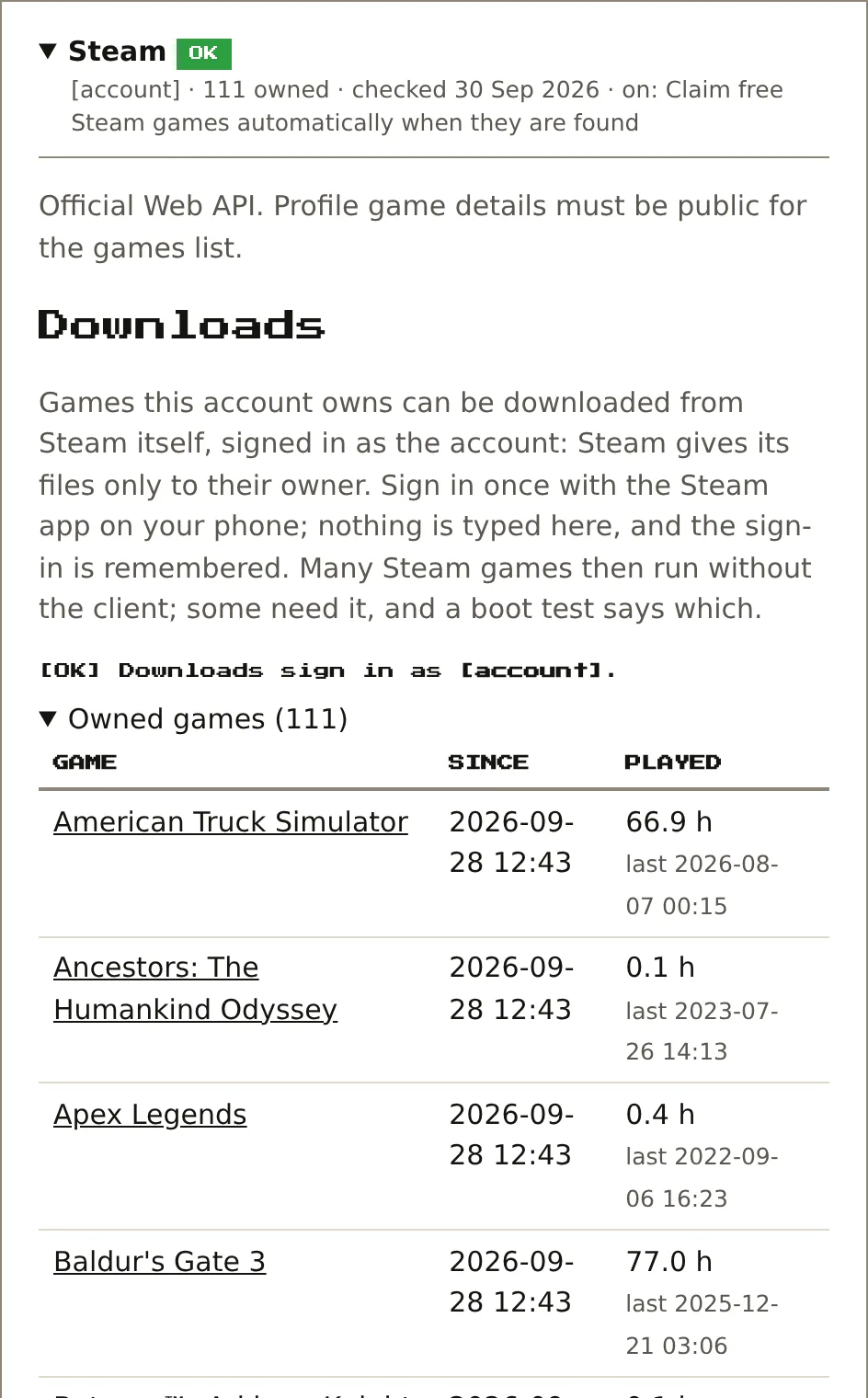
Settings has a Storefronts page with one card per store. Each store gets connected the way that store allows. None of them keeps a password.
- Steam: the account's Steam ID and a Web API key.
- GOG: a sign-in link; you paste back the address the page lands on.
- Epic: a link that shows a one-time code, swapped for a lasting token when you press Verify.
- Xbox / Microsoft: a key from OpenXBL, a third-party Xbox Live service.
- PlayStation: a token copied from Sony's own site.
- Humble: Humble has no proper sign-in for other apps, so it's one session cookie, copied from the browser once.
- Nintendo: signs in through the Switch Online app's own flow. Nintendo has no purchase list other apps can read, so the owned games come from a paste. You copy the text of your nintendo.com order-history page into the card. Games become owned Switch games and memberships become subscriptions. A paste only adds and updates, never removes, so pasting one filtered tab can't wipe the rest.
Each card collapses to two lines: whether it works and the key facts, like how many games it found. Open a card for its settings and a More info section on getting that store's token. The card also warns before a sign-in expires, so nothing quietly stops working.
Once a day it reads what's owned on each connected store and matches it to the catalogue. Game pages then say "owned on Steam", "owned on GOG" and so on. The PC shelves list store games that are owned but not set up locally yet.
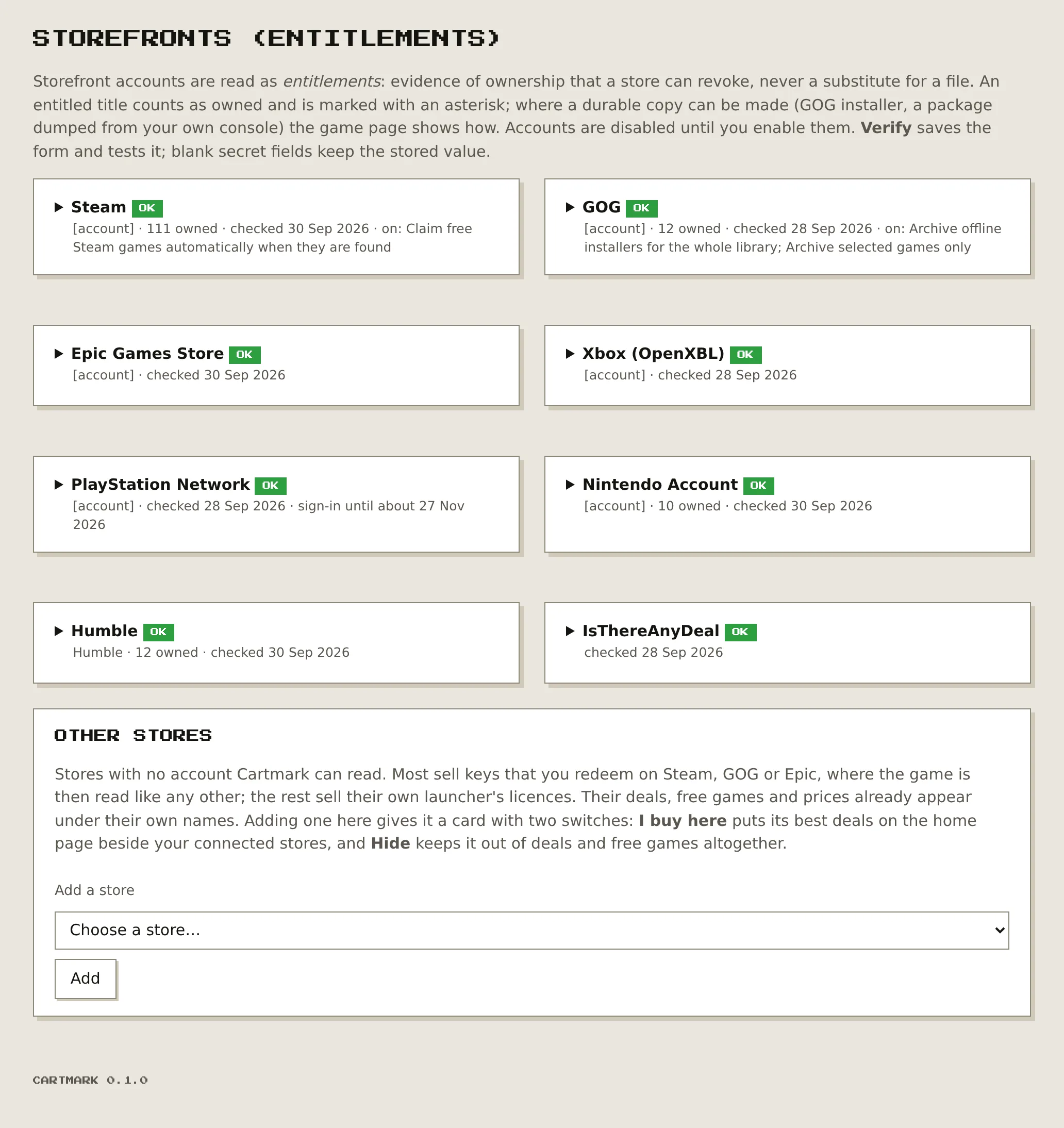
Each card has an Owned games list that loads when you open it: the game, when the account got it, and, for Steam, hours played and when it was last played.
A game added to the systems you want, from its page
Add… on a game's page opens a window listing every system the catalogue has that game on. Tick the systems you want; each ticked row has its own pill, monitored or not monitored. Monitored means Cartmark looks for a copy by itself and takes the best one that passes every check. Not monitored adds the game to that system's list and leaves it there, never searched for or taken by itself, which suits a game you want to note without downloading yet.
A system with no shelf, or one turned off, says so in its row and can't be ticked; a system the game is already added to or held on shows how it stands instead. Nothing is added or fetched until you press Add, and the window says what it added.
Prices, and "is this actually a good deal?"
For games on the watch list, Cartmark tracks the price on every store that sells them. It reads Steam, GOG and Microsoft directly, and everything else through IsThereAnyDeal. Up to five years of history is kept per store. It's stored as spans ("$39.99 for three months, then 50% off for two weeks") rather than a row every day, and each game draws a small price chart.
On top of that, every price gets a plain-English verdict from that game's own history:
Lowest everGood sale: matches its usual low of $19.99Has been lower: last at $14.99 in a winter sale; likely again around the next Autumn SaleFull price: it usually drops to $19.99 in salesThat third one works because a game's low points tend to line up with the stores' recurring seasonal sales: Spring, Summer, Autumn and Winter. So it can say when the next one's due.
It tries to be honest about all this. Every verdict says what it's based on, and when a game has had fewer than three sales in five years it says nothing rather than guess.
Planned: a publisher pattern, like "this publisher's games usually hit 75% off within 6 months of release". It will only speak up when at least five of the publisher's games back it up, and it will be labelled as a pattern, not a promise.
Deals on the home page
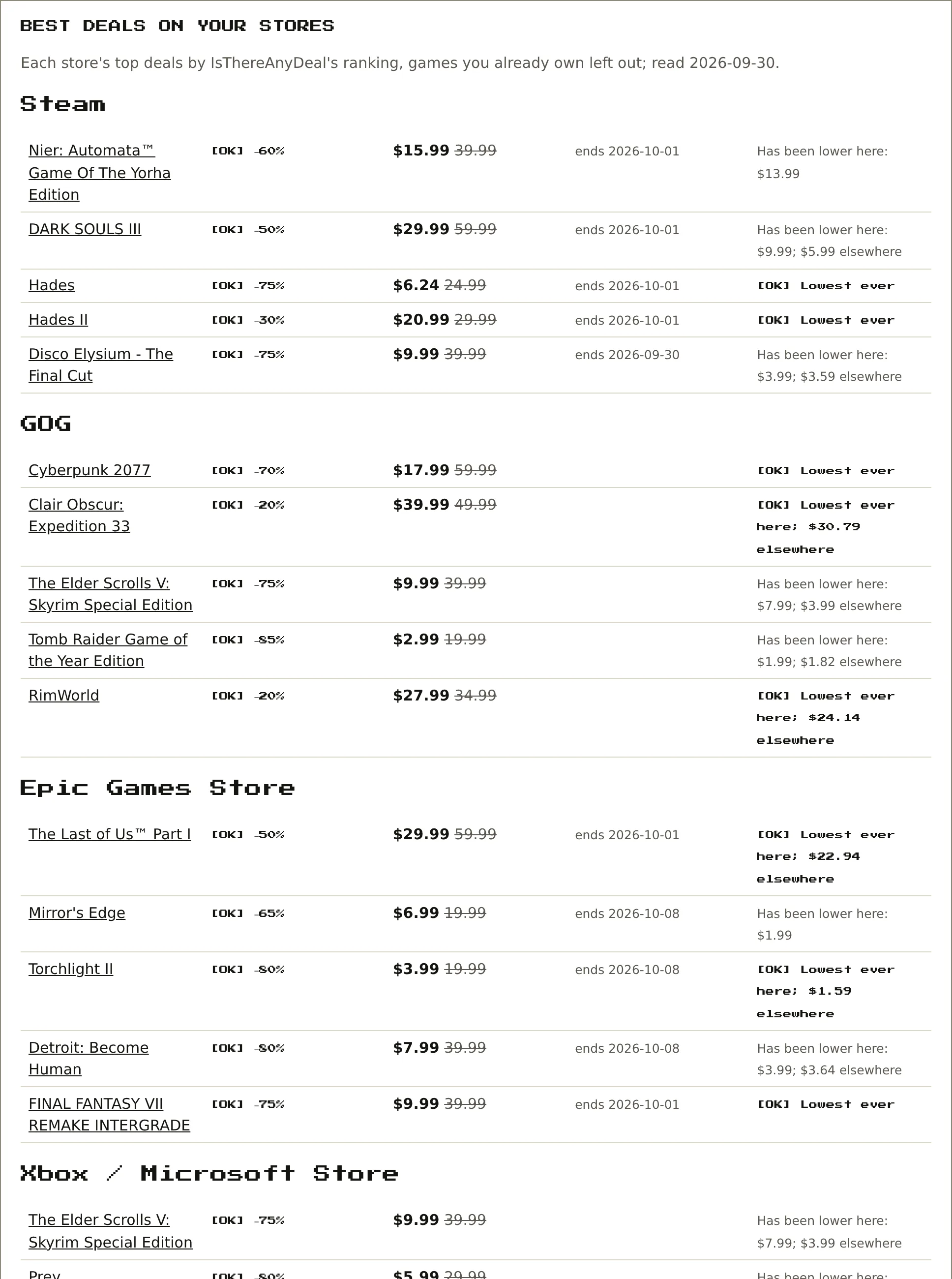
The home page shows the five best current deals on each connected store. "Best" is IsThereAnyDeal's own ranking, not just the biggest discount. Sorting by discount alone gives you a wall of 95%-off shovelware. The ranking puts real games up top, as the screenshot shows: NieR: Automata, Hades, Disco Elysium, Cyberpunk 2077.
It hides deals on games already owned, but only where owning it matters:
- Owned on that same store: hidden there. Buying it twice on one store is pointless.
- A DRM-free copy owned anywhere: hidden everywhere. That means a GOG game, a Humble DRM-free download, or a Steam game with no extra DRM.
- Only a locked licence, say on Epic: still shown on the other stores. A copy you can keep is still worth having.
The last column is a quick verdict against IsThereAnyDeal's records: "Lowest ever", or "Has been lower here: $9.99; $5.99 elsewhere". It knows the 30-odd stores IsThereAnyDeal follows (Fanatical, Green Man Gaming, IndieGala, GamesPlanet and the rest), so any price or giveaway gets labelled with the right store, even one with no account connected.
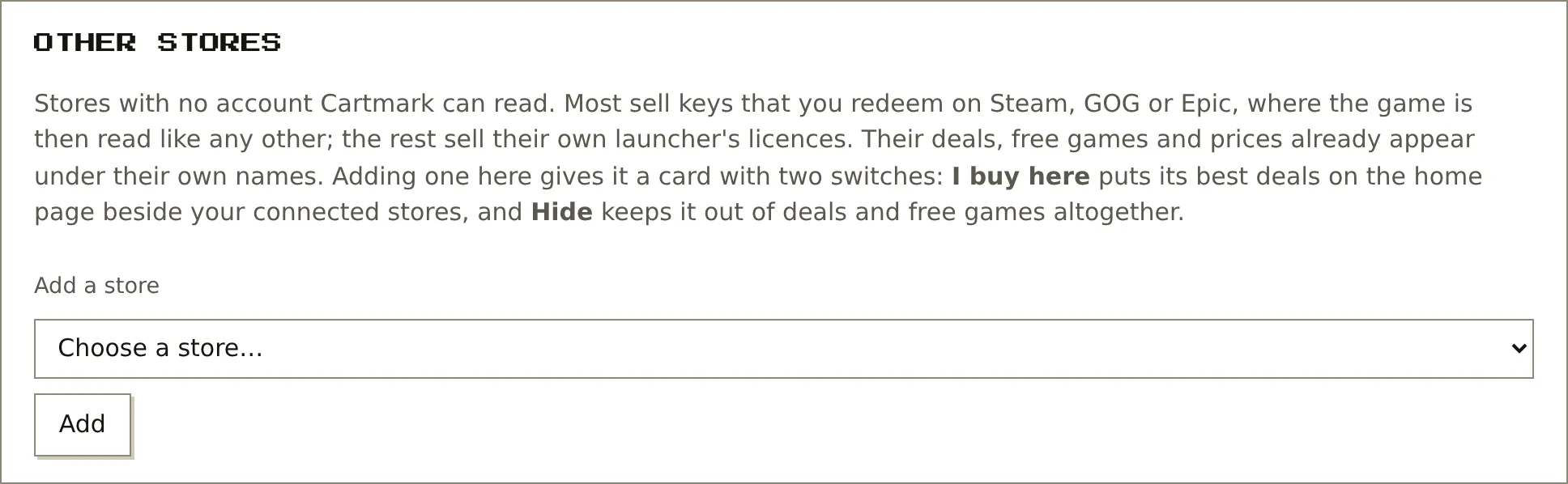
The stores with no account to connect (Fanatical, Green Man Gaming, IndieGala and the rest) have their own Other stores section. Add one from the list and it gets a card with two switches:
- I buy here: its best deals join the home page beside the connected stores.
- Hide: it drops out of deals and free games altogether.
Whole series on sale, with the real totals
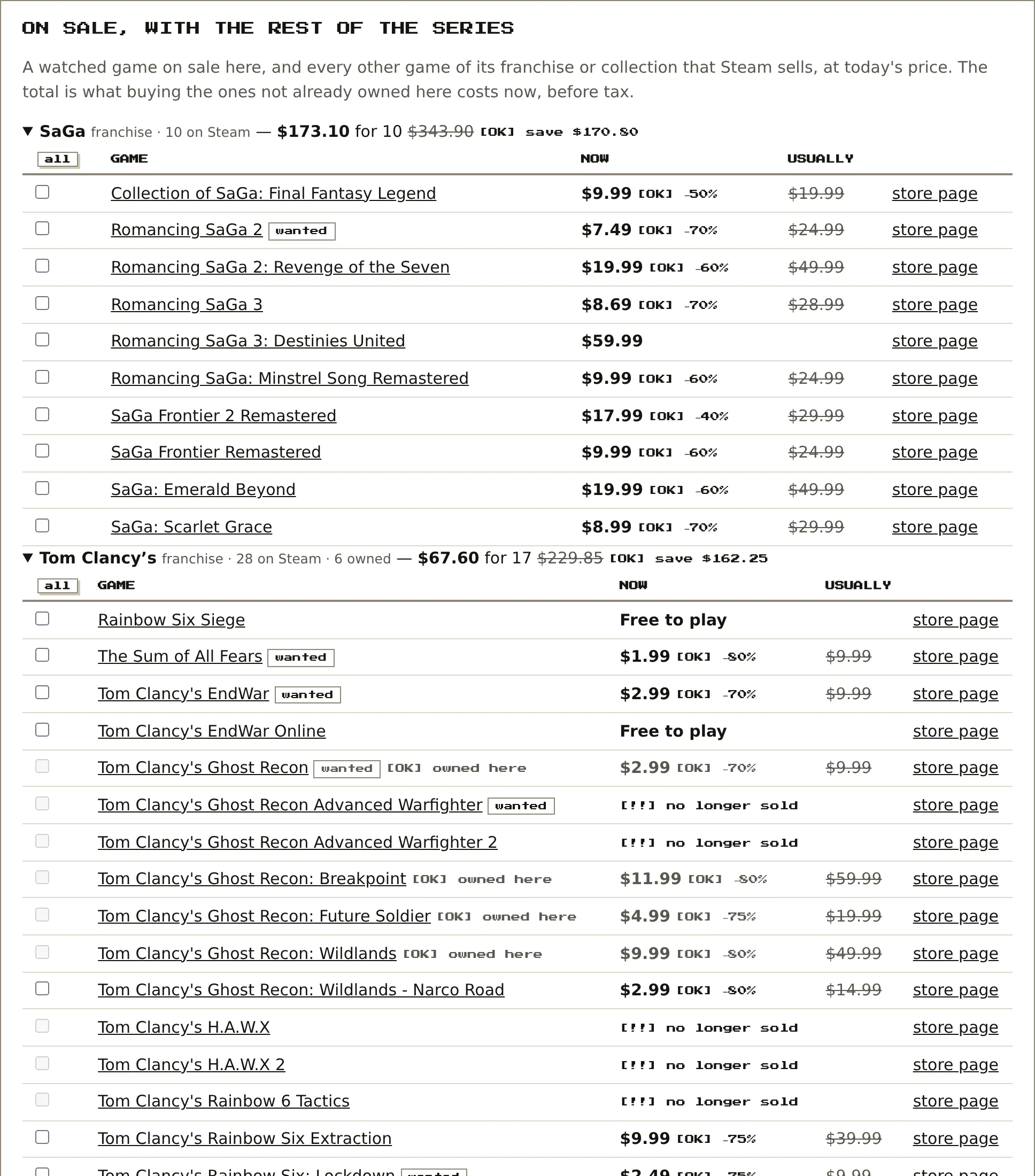
This only happens on stores where buying gets you something you keep: GOG, Steam and Humble. When a watched game goes on sale there, that store's page gets an On sale, with the rest of the series section. It takes the discounted game and pulls in every other game in its franchise or collection that the same store sells, at today's price. One Star Wars game on sale brings in the whole Star Wars shelf on GOG, not just the one game.
Each series is a collapsible block, and its top line sums it up. This is a real one from GOG:
- $117.16 for 24: what it costs right now to buy every game in the series that isn't already owned on that store and has a price.
- $303.76: what those same 24 games would cost at full price.
- save $186.60: the actual saving, the gap between the two.
Games already owned are counted but left out of the total. On Steam, the Tom Clancy block reads "28 on Steam · 6 owned", and those six are greyed out and can't be ticked. Games a store has stopped selling show "no longer sold", and ones without a price yet show "not priced yet".
Blocks are ordered by biggest saving, so the best-value series is always on top. The top three open by default and the rest are a click away.
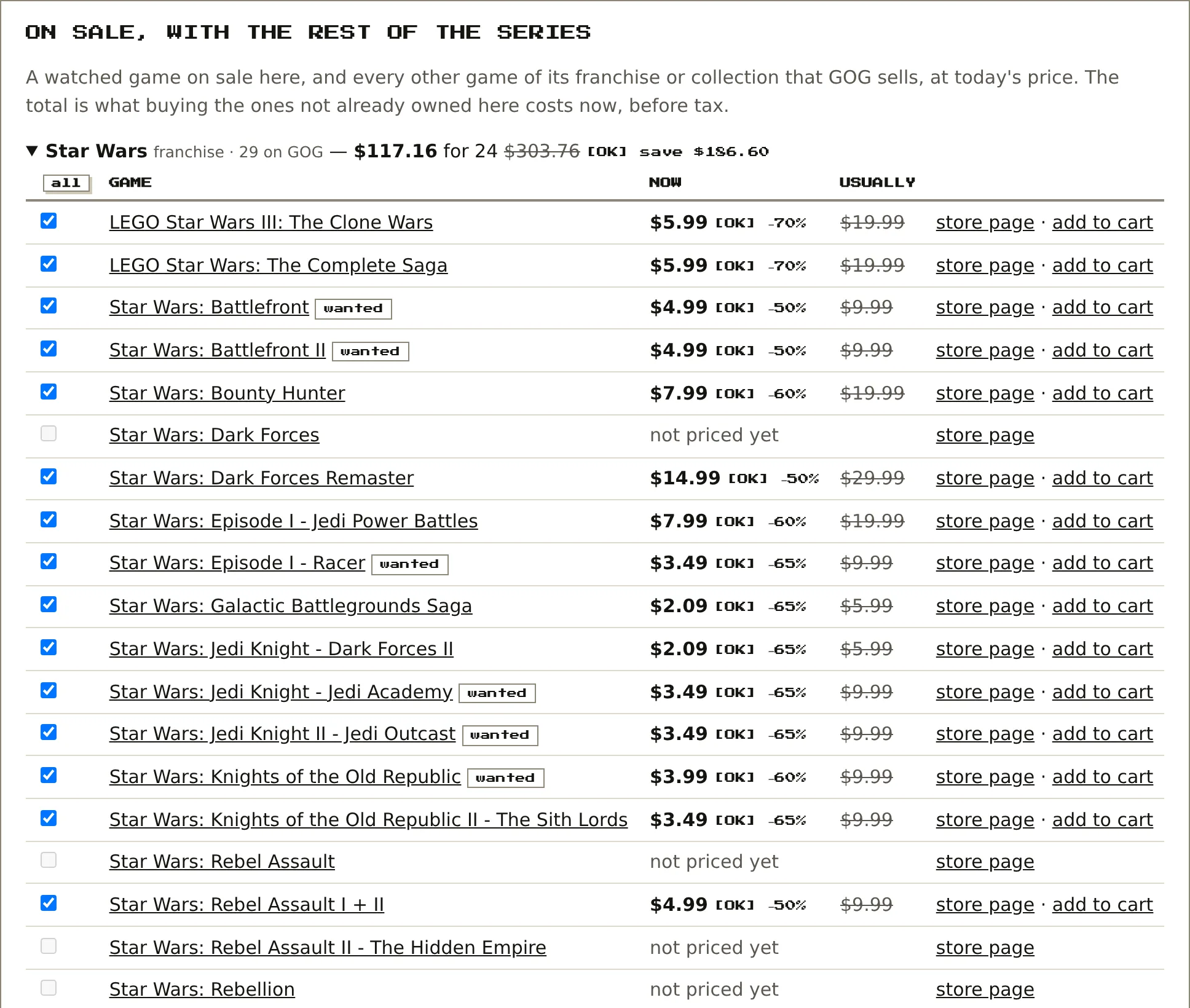
Every row has today's price, the usual price and a checkbox. The all button ticks the whole series, and you can tick games across different series. A bar at the bottom keeps a running count and total before tax, so you can see what a shopping run costs before committing to it.

One button then acts on the whole selection:
- On GOG, "Add selected to GOG cart": it opens one small GOG window, signed in as you, and adds each chosen game to your real GOG cart in turn. Then you check out on GOG as normal. GOG doesn't allow adding to the cart from another site in the background, so these are genuine visits. Nothing is bought.
- On Steam and elsewhere, "Open selected store pages": it opens each chosen game's page.
On licence-only stores (Epic, Microsoft, PlayStation), prices are shown for comparison only. They raise no alerts and offer no series to buy. Each game shows the cheapest copy you could keep, wherever one's sold.